Getting your event noticed on Google Ads can feel like a puzzle, right? You want people to actually sign up, not just see your ad. It’s all about setting things up smart from the start. We’re talking about how to structure your campaigns so that every click is more likely to lead to a booking or ticket sale. Let’s break down how to make your Google Ads event conversions happen.
Understanding Google Ads Account Structure For Event Conversions

Setting up your Google Ads account correctly from the start is like building a solid foundation for a house. If it's shaky, everything else you build on top will eventually have problems. For event promotion, this means making sure your account is configured to accurately track who's signing up or buying tickets. It’s not just about getting clicks; it’s about getting people to actually attend your event.
Core account settings for conversion tracking
At the very top level of your Google Ads account, there are some key settings that affect everything. Think of these as the account-wide rules. You'll want to make sure your account name is clear, your billing is set up, and importantly, your time zone is correct. This last one is pretty important for ad scheduling. Also, enabling auto-tagging is a must for conversion tracking; it adds a special tag to your URLs so Google knows what's happening after someone clicks your ad. You can also set up a tracking template here if you use other systems to track where your clicks come from, like UTM parameters. Getting these basics right means you're ready to measure what matters.
Linking google analytics for deeper insights
Connecting your Google Ads account to Google Analytics (GA4) is a really smart move. It’s not strictly required, but it gives you a much clearer picture of what happens after someone clicks your ad. You can see how users interact with your website, which pages they visit, and if they complete other actions besides just signing up for your event. This connection helps you understand the full customer journey, not just the initial click. It’s a bit like getting a second opinion on your advertising performance. You can link them through the 'Tools & Settings' menu, under 'Linked Accounts'.
Account level conversion and attribution models
Within your account settings, you'll define what counts as a 'conversion'. For an event, this could be a ticket purchase, a form submission for more information, or even a phone call. You also need to choose an attribution model. This model decides how credit is given to different ads if a user interacts with more than one before converting. For instance, if someone sees a search ad, then clicks a display ad, and then converts, the attribution model determines which ad gets the credit. Models range from 'first click' (giving all credit to the first ad) to 'last click' (giving all credit to the last ad) or even more complex ones that spread the credit out. Choosing the right model helps you understand which parts of your advertising are truly driving results. Getting these foundational settings right is key to understanding your campaign's true success. You can find more details on choosing the right model in Google Ads best practices.
It’s easy to get caught up in the day-to-day of creating ads and managing bids, but taking the time to set up your account structure and conversion tracking properly upfront will save you a lot of headaches and wasted money down the line. Think of it as an investment in accurate data and better decision-making for all your future event promotions.
Campaign Level Strategy for Event Bookings
When you're setting up your Google Ads account, thinking about the campaign level is super important for getting event bookings. This is where you lay the groundwork for everything else. Your campaign is the main container for your advertising efforts. It's like the big umbrella that covers your goals, your budget, and where your ads will show up. Getting this right from the start means your ads are more likely to reach the right people who actually want to book your event services.
Defining campaign goals for event promotion
First off, what do you actually want to achieve with your ads? For event bookings, your main goal is probably getting people to sign up or request a quote. Google Ads lets you pick objectives like 'Leads' or 'Sales'. If you want people to fill out a form or call you, 'Leads' is usually the way to go. If you have an online booking system where people can pay right away, then 'Sales' might be a better fit. It's not just about getting clicks; it's about getting useful clicks that lead to actual bookings. Think about what success looks like for your event business.
Choosing the right campaign type for events
Google Ads has a bunch of campaign types, but for events, some are definitely better than others. For most event rental businesses, starting with a Search campaign is the smartest move. These are the ads that show up when someone types something like “party chair rentals” or “wedding tent hire” into Google. Why? Because these people are actively looking for what you offer, meaning they have high intent. Other types, like Display campaigns (banner ads on websites), are more for building brand awareness or retargeting people who have already visited your site. Performance Max campaigns can be good for broad reach, but they need a lot of creative assets and give you less control, so Search is usually the best starting point.
Setting budgets and bids for event campaigns
Your budget is how much you're willing to spend each day or month. Bidding is how much you're willing to pay for each click. It sounds simple, but it's a bit of a balancing act. You want to bid enough to get your ads seen by the right people, but not so much that you're burning through cash too quickly. A good starting point is to use an automated bidding strategy that focuses on conversions, like 'Maximize Conversions' or 'Target CPA' (Cost Per Acquisition), once you have enough conversion data. This lets Google's system figure out the best bids for you. Remember, your budget and bids directly impact how often your ads show and who sees them. It’s a good idea to monitor your Google Ads management closely to see how these settings are performing.
Setting realistic budgets and understanding bidding strategies are key to not wasting money. You need to find that sweet spot where you're visible enough to get bookings without overspending.
Ad Group Organization for Event Services

When you're setting up your Google Ads account, organizing your ad groups is a big deal. It’s how you keep things tidy and make sure the right ads show up for the right searches. Think of ad groups as specific folders for your services or event types. Each ad group should focus on a narrow theme, like 'wedding chair rentals' or 'birthday party tents'. This tight focus helps Google understand what you're advertising and show your ads to people who are actually looking for that specific thing. This relevance is key to getting more clicks and fewer wasted dollars.
Thematic grouping of event keywords
Start by grouping keywords that are very similar in meaning and intent. If someone searches for 'rent tables for party' and 'party table rental near me,' those keywords belong together. But 'wedding decorations' and 'corporate event planning' probably shouldn't be in the same ad group. You want each ad group to have a clear, single theme. This makes it easier to write ads that directly match what people are searching for. For example, if you rent out bouncy houses, you might have one ad group for 'bounce house rentals,' another for 'inflatable party rentals,' and maybe a third for 'kids party rentals.' This way, your ads can be super specific.
Aligning ad groups with user intent
User intent is basically what someone is trying to achieve when they type something into Google. Are they just browsing, or are they ready to book? Your ad groups should reflect this. If someone searches 'how much do party rentals cost,' they're probably in the early stages of planning. An ad group focused on informational keywords like this might lead to a blog post or a general services page. But if someone searches 'book bouncy house now,' they're ready to go. That keyword needs its own ad group, with an ad that says 'Book Your Bouncy House Today!' and links directly to your booking page. Understanding this difference helps you create ad groups that match the user's mindset at that exact moment. It’s all about putting the right message in front of the right person at the right time. You can see how organizing your Google Ads account systematically can make a big difference.
Creating single theme ad groups for precision
Having ad groups that are too broad is a common mistake. When an ad group covers too many different services or ideas, your ads become generic, and your keywords get mixed up. This hurts your Quality Score, which means you pay more per click. The best practice is to create ad groups with a single, clear theme. This means each ad group should have a tightly related set of keywords and ads that all point to one specific service or product. For instance, if you offer different types of tents, you might have separate ad groups for 'frame tent rentals,' 'pole tent rentals,' and 'canopy tent rentals.' This level of detail allows for highly targeted ad copy and ensures that your landing page is perfectly relevant to the search query. It might seem like more work upfront, but it pays off in better performance and lower costs.
Crafting High-Converting Ads for Events
A great event ad does more than just grab attention, it gets people to click, engage, and ultimately buy tickets. From the visuals you choose to the words you write, every detail matters in turning interest into action. By understanding what motivates your audience and structuring your ads around clear goals, you can create campaigns that not only look good but also drive real results.
Focusing ad copy on user intent
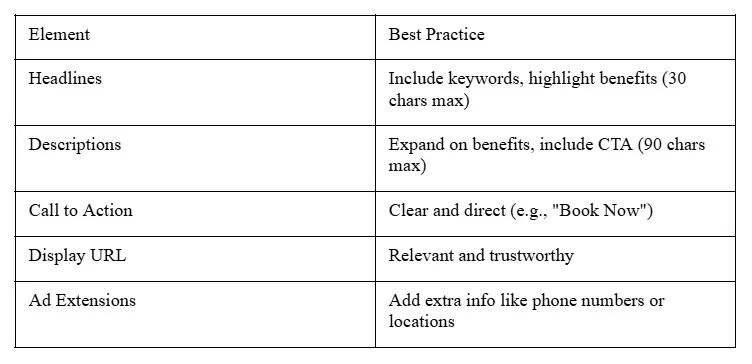
When people search on Google, they're usually looking for something specific. They want answers, prices, or to know if something is available. Your ad copy needs to speak directly to what they're thinking. If someone searches for "event tent rentals," your ad should immediately confirm you offer that. Mentioning things like "instant quotes" or "available this weekend" can really grab attention because it addresses their immediate need.
Incorporating keywords and unique selling propositions
Make sure the words people are searching for show up in your ad's headlines. Google highlights these terms, making your ad look more relevant and increasing the chance someone clicks. Think about what makes your event services stand out. Do you offer free setup? Maybe you have unique decor options? Mentioning these unique selling points, like "free delivery" or "exclusive floral designs," can make your ad much more appealing than a competitor's. It’s about showing why you’re the best choice for their event.
Implementing strong Calls to Action for event sign ups
Every ad needs to tell people what to do next. Don't leave them guessing. Use clear calls to action (CTAs) like "Book Your Date Today," "Get a Free Quote Now," or "Check Availability." A strong CTA guides the user and encourages them to take that next step towards booking your event services. It’s a simple but really important part of getting people to convert.
Here's a quick look at what makes a good ad: