Trying to figure out where your ticket sales are actually coming from? It feels like a shot in the dark sometimes, right? You're running ads on Facebook, sending out emails, maybe even working with some partners. But which of those things is actually getting people to click that 'buy ticket' button? Without the right tools, it's just a guessing game. This is where UTM tracking comes in. It’s like putting a little tracker on every link you share, so you can see exactly who sent you a visitor and what they did when they got there. Let's break down how to use this to your advantage for your next event.
Key Takeaways
- UTM tracking adds specific codes to your links, letting you see exactly which marketing efforts lead to ticket sales.
- By using UTMs like `utm_source`, `utm_medium`, and `utm_campaign`, you can identify top-performing channels and specific promotions.
- Properly set up UTMs move you from guessing about marketing effectiveness to having clear data to back up your decisions.
- You can track sales from partners, influencers, and even specific ads or emails by creating unique UTM-tagged links for each.
- Consistency in how you create and use UTM codes is vital for accurate reporting and understanding your ticket sales data.
Understanding The Power Of UTM Tracking For Ticket Sales
When you're selling tickets, it's easy to guess where your customers are coming from. Maybe you think your Facebook ads are doing great, or perhaps your email blasts are really hitting the mark. But guessing isn't a strategy, and without solid data, you're basically flying blind. That's where UTM tracking comes in. It's a simple way to add a little code to your links that tells you exactly where people clicked before they landed on your ticket page.
Think about it: you're running ads on social media, sending out newsletters, maybe even putting up flyers. How do you know which of those efforts actually led to someone buying a ticket? UTM codes are the answer. They let you see, for instance, that a specific Facebook ad campaign brought in 50 ticket sales, while your email newsletter only brought in 10. This kind of information is gold.
Why UTM Tracking Is Crucial For Ticket Sales
Without proper tracking, you're missing out on a ton of useful information. You might be spending money on marketing channels that aren't really working, while ignoring ones that could be much more effective. UTM tracking helps you move past assumptions and see the real impact of your marketing.
Moving From Assumptions To Proof With UTM Data
Instead of saying, "I think our Instagram posts are working," you can say, "Our Instagram posts from last week drove 25 ticket sales." This shift from guesswork to concrete data allows you to make smarter decisions about where to put your time and money. You can see which campaigns are actually driving revenue and which ones are just noise. This is how you start building a ticket sales strategy that's based on facts, not feelings. You can even track sales from specific partners or influencers by giving them unique links, which is a great way to see who your best collaborators are. Check out this guide on using UTM tracking to pinpoint traffic sources.
The Role Of UTM Tracking In Multi-Channel Marketing
In today's world, people interact with your event through many different channels. They might see a Facebook ad, then get an email, and finally click a link from a partner. UTM tracking helps you connect those dots. It allows you to understand the customer journey across all these touchpoints. This means you can see how different channels work together and which ones are most effective at different stages of the buying process. It’s about understanding the whole picture, not just isolated pieces.
Implementing UTM Tracking For Your Event
So, you've decided to get serious about tracking where your ticket sales actually come from. That's a smart move. Instead of just guessing which marketing efforts are paying off, you can use UTM tracking to get real data. It's not as complicated as it sounds, and it makes a huge difference in understanding your audience and your marketing spend.
Creating Effective UTM Codes For Your Links
Think of UTM codes as little labels you stick onto your web links. When someone clicks a link with a UTM code, your analytics tool (like Google Analytics) reads that label and tells you exactly where that click came from. It's like putting a return address on every single invitation you send out. You don't need to be a tech whiz to create these. Tools like Google's Campaign URL Builder make it super simple. You just fill in a few blanks: your event's website URL, where the link is coming from (like Facebook or an email newsletter), what kind of channel it is (social, email, paid ad), and the name of your specific campaign (like 'early_bird_sale'). The tool then spits out a ready-to-use link with all the tracking info attached. The key is to be consistent with how you name things. If you use 'facebook' one time and 'FB' the next, your reports will get messy. Decide on a naming convention and stick to it. This helps you see the overall performance of your campaigns.
Key UTM Parameters To Track Ticket Sales
There are five main UTM parameters you can use, but you don't always need all of them. For ticket sales, the most important ones are:
utm_source: This tells you who sent the traffic. Examples:facebook,google,newsletter,partner_site.utm_medium: This tells you how they got to you. Examples:social,email,cpc(cost per click),affiliate.utm_campaign: This is for naming your specific marketing initiative. Examples:spring_sale,webinar_promo,vip_package.utm_content: This is useful for differentiating similar links within the same campaign. For example, if you have two different Facebook posts promoting the same event, you could useutm_content=post_1andutm_content=post_2.utm_term: This is mainly for paid search ads, to identify specific keywords.
Using these parameters helps you break down your results. You can see not just that Facebook sent you traffic, but which specific Facebook post or ad led to a ticket sale.
Testing Your UTM Campaign Links
Before you blast your links out everywhere, it's a good idea to test them. Create a link, paste it into your browser, and then check your analytics platform to make sure the data is showing up correctly. You want to confirm that the source, medium, and campaign names are being recorded as you intended. This quick check can save you a lot of headaches later on. If you're using a ticket widget on an external site, you can also track where those sales are coming from using the utm_referrer parameter. It's all about making sure the data you're collecting is clean and accurate, so you can trust the insights you get.
Making sure your UTM codes are set up correctly from the start is way easier than trying to fix messy data later. It's the difference between having a clear map and wandering around lost.
Leveraging UTM Data For Smarter Event Strategies
Once you've got your UTM codes set up and links out there, the real work begins: figuring out what all that data actually means for your event. It's not just about seeing numbers; it's about turning those numbers into actionable steps. Think of it like this: you've been sending out flyers, emails, and posting on social media, but you weren't sure which ones were actually bringing people to buy tickets. Now, with UTM tracking, you can see that the email campaign about the early bird special brought in 50 ticket sales, while that Facebook ad only got 5. That's the kind of clarity we're talking about.
Analyzing UTM Data In Your Analytics Platform
Your analytics platform, whether it's Google Analytics, or something else, is where all this tagged traffic data lands. You'll want to look for specific reports that break down traffic by source, medium, and campaign. For example, you might see a report showing that traffic from utm_source=newsletter and utm_medium=email resulted in a higher conversion rate for ticket purchases compared to traffic from utm_source=facebook and utm_medium=social_ad. It's about digging into these details to understand the journey a potential attendee took before they bought a ticket.
Identifying Top Performing Channels For Ticket Sales
This is where you start to see the winners. By looking at your UTM data, you can directly identify which channels are driving the most ticket sales. Maybe your LinkedIn posts are bringing in a lot of clicks, but they aren't converting to sales. On the other hand, a specific blog post you shared via email might be a surprise hit. You can create a simple table to visualize this:
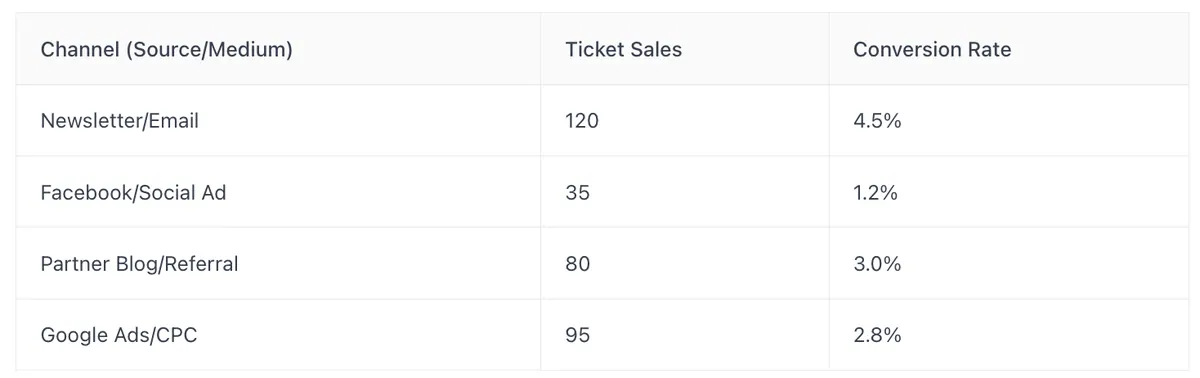
This kind of breakdown makes it super clear where your marketing budget is working hardest.
Optimizing Marketing Efforts Based On UTM Insights
Knowing what works is only half the battle; the other half is doing more of it and less of what doesn't. If your UTM data shows that email marketing is your golden ticket for sales, you'll want to invest more time and resources there. Perhaps you notice that a particular type of social media post, identified by utm_content, consistently drives more engagement and leads to ticket sales. You can then replicate that content strategy. Conversely, if a specific ad campaign isn't performing, you can pause it or rework it based on the data. It’s about making smart, data-driven decisions to get the best return on your marketing efforts.
Don't just collect UTM data; actively use it to refine your event promotion strategy. Small adjustments based on clear insights can lead to significant improvements in ticket sales and overall event success.
Advanced UTM Tracking Techniques For Events
So, you've got the basics of UTM tracking down, which is great. But what about when things get a little more complex? Sometimes, you need to dig deeper to really see what's working, especially when you're working with partners or trying out different ad creatives. This is where some of the more advanced UTM techniques come into play. They help you get a clearer picture of your event's performance across various touchpoints.
Tracking Partner and Influencer Ticket Sales With UTMs
Working with partners or influencers to promote your event? You'll definitely want to know which ones are actually driving ticket sales. By creating unique UTM links for each partner, you can see exactly how much traffic and how many conversions come from their efforts. For example, you could set up links like your-event-page.com?utm_source=partner_name&utm_medium=affiliate&utm_campaign=event_name. This way, you can easily track their contribution and even use this data for future collaborations or commission payouts. It’s a straightforward way to measure the ROI of your partnerships.
Using UTM Content For A/B Testing Event Promotions
Ever wonder if your Facebook ad copy is better than your Instagram ad copy, or if a specific call-to-action on your email newsletter is outperforming another? That's where the utm_content parameter shines. You can use it to differentiate between similar links or ads within the same campaign. For instance, if you're running two different Facebook ads for the same event, you could tag them like this:
- Ad 1:
your-event-page.com?utm_source=facebook&utm_medium=cpc&utm_campaign=early_bird&utm_content=ad_v1_blue_button - Ad 2:
your-event-page.com?utm_source=facebook&utm_medium=cpc&utm_campaign=early_bird&utm_content=ad_v2_green_button
By analyzing the utm_content data in your analytics, you can see which ad version is driving more clicks and ticket sales. This is super helpful for optimizing your ad spend and making sure you're using the most effective messaging. It’s a smart way to get more out of your marketing campaigns.Understanding UTM Referrer For Widget Performance
If you're using a ticket widget on different websites or even different pages on your own site, the utm_referrer parameter can be a lifesaver. It tells you exactly which external URL the traffic came from. So, if you have your ticket widget embedded on a partner's blog, a local news site, or even a specific landing page on your own domain, utm_referrer will show you that source. This helps you understand which placements are most effective for driving ticket sales through your widget. For example, if you see a lot of sales coming from utm_referrer=partnerblog.com, you know that's a valuable placement to maintain or even expand upon. It gives you concrete data on where your widget is actually performing.
Common Pitfalls And Best Practices In UTM Tracking
So, you've gotten the hang of creating UTM codes and you're ready to start tracking your event ticket sales. That's great! But before you go tagging every link in sight, let's talk about a few things that can trip you up. It's easy to mess up UTM tracking, and when you do, your data gets messy too. That means you can't really tell what's working and what's just noise.
Ensuring UTM Codes Remain Intact Across Platforms
This is a big one. Sometimes, when you share a link, especially on social media or in certain email builders, the UTM codes can get chopped off. It's like sending a letter without the address, the post office doesn't know where it's going. If your UTM codes disappear, that traffic just gets lumped into a general 'direct traffic' category. You lose all the specific info about where it came from. Always test your links after you paste them into different platforms to make sure the whole URL, including your UTM tags, stays put. A quick check before you hit 'publish' can save you a lot of headaches later.
Maintaining Consistency For Accurate UTM Reporting
Imagine you're tracking a campaign on Facebook. One day you tag it utm_source=facebook, the next day utm_source=FB, and then maybe utm_source=FacebookPage. Your analytics tool sees these as three totally different sources. This makes it really hard to get a clear picture of how your Facebook efforts are doing. It's best to decide on a naming convention and stick to it. Lowercase is usually a good bet, and avoid spaces, use underscores or hyphens instead. A shared spreadsheet where everyone on your team can see the agreed-upon naming conventions is super helpful for keeping things consistent across all your campaigns.
Best Practices For External Link UTM Tagging
UTM tracking is most useful when you're pointing people to your event from outside your own website. Think about links you share in emails, on social media posts, in paid ads, or even on partner websites. Tagging these external links tells your analytics exactly which of these outside efforts are driving people to buy tickets. It's less about tracking clicks within your own site and more about understanding where the initial interest came from. So, focus your UTM efforts on those outbound links. It’s the best way to see which channels are actually bringing in the audience you want.
Keeping your UTM tags clean and consistent is like keeping your tools organized. It makes the job of analyzing your marketing efforts much easier and the results much more reliable. Don't skip the small stuff; it makes a big difference in the end.
Integrating UTM Tracking With Your Ticketing System