Getting tickets for an event should be easy, right? But sometimes, it feels like a real hassle. This article looks at how we can make the whole process, from first looking for tickets to actually getting into the event, much smoother. We'll talk about how good design and smart technology can make buying tickets less of a headache for everyone.
Key Takeaways
- Making the ticket buying process simple and clear helps people find and buy tickets without trouble.
- Having a quick and easy checkout, even when lots of people are trying to buy tickets at once, is super important.
- Using mobile apps and special codes can help stop fake tickets and make sure only real ticket holders get in.
- After someone buys a ticket, keeping them interested with info about other events or ways to manage their tickets can build loyalty.
- Making sure the ticket platform works well on all devices, like phones and computers, means everyone has a good experience, no matter how they access it.
Streamlining the Pre-Purchase Journey
Before anyone even thinks about buying a ticket, there's a whole process they go through. It's more than just finding an event; it's about making the entire experience smooth and easy. If this part isn't done well, people might just give up before they even get to the checkout. Let's look at how to make this initial stage better.
Navigating Event Discovery
Finding the right event should be simple. Think about how people search for things online. Are they using keywords? Are they browsing by category? The easier it is to find what they're looking for, the better. A good search function is key, and clear categories help a lot. Consider these points:
- Make the search bar prominent and easy to use.
- Use filters to narrow down results (date, location, price).
- Showcase popular or recommended events.
Event discovery is more than just a search bar; it's about guiding users to the experiences they'll love. Think about personalized recommendations and intuitive browsing options.
Understanding Ticketing Platform Contracts
Ticketing platform contracts can be confusing. It's important to know what you're agreeing to before you start selling tickets. This includes fees, payout schedules, and any restrictions on ticket sales. Here's a quick rundown:
- Read the fine print carefully.
- Understand the fee structure (per-ticket, percentage-based, etc.).
- Know your responsibilities as a seller.
Optimizing Marketing Channels
How are you getting the word out about your events? Are you using social media, email, or other channels? It's important to use the right channels and tailor your message to each one. Think about where your target audience spends their time online. For example, you can optimize critical user journeys to improve the marketing flow. Here are some ideas:
- Use social media to promote events and engage with potential attendees.
- Send email newsletters with upcoming events and special offers.
- Consider using paid advertising to reach a wider audience.
Enhancing the Ticket Purchase Experience

Let's be real, buying tickets online can be a pain. You're excited about an event, but the process itself? Not so much. This section is all about making that purchase experience way better.
Intuitive Interface Design
Think about the last time you bought tickets online. Was it easy? Could you find what you needed quickly? A good interface is key. It's got to be clean, simple, and guide you through the process without making you want to throw your computer out the window. Clear calls to action, easy-to-understand layouts, and mobile-friendly designs are all part of the puzzle. No one wants to hunt for the "buy tickets" button.
Efficient Checkout Processes
Okay, you've picked your tickets. Now comes the checkout. This is where things often fall apart. Long forms, confusing payment options, and surprise fees can kill the excitement fast. A smooth checkout means:
- Minimizing the number of steps.
- Offering multiple payment choices (credit card, PayPal, etc.).
- Being upfront about all costs.
- Allowing guest checkout options.
- Providing clear error messages.
Streamlining the checkout isn't just about speed; it's about building trust. People are more likely to complete a purchase if they feel the process is transparent and secure.
Managing High Traffic with Digital Queues
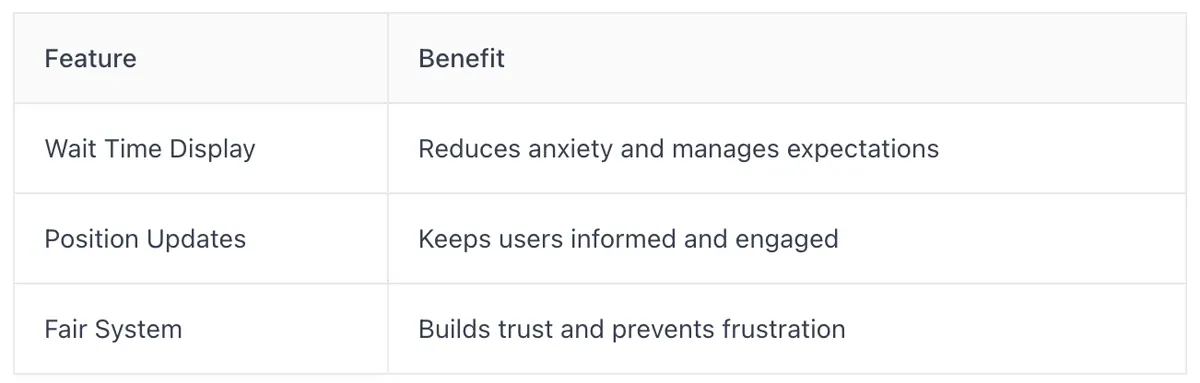
Ever tried buying tickets for a super popular event the second they go on sale? Website crashes, error messages, pure chaos. Digital queues are a way to handle that rush. Instead of everyone flooding the site at once, people are placed in a virtual line. It's not perfect, but it's way better than a complete meltdown. The key is to make the queue experience as painless as possible:
- Provide clear wait time estimates.
- Offer updates on your position in line.
- Make sure the queue is fair and random.
- Don't let people time out while they're waiting.
Here's a simple way to think about it:
Securing Digital Tickets From Checkout to Entry
Combating Ticket Fraud with Mobile Apps
Ticket fraud is a growing concern, and mobile apps are stepping up as a key defense. Using mobile tickets accessed through a dedicated app is becoming a standard measure to fight fraud. These apps discourage static screenshots and often work offline, adding layers of security. Plus, many platforms offer digital ticket transfer systems, letting users easily send tickets to someone else securely through the app or website. This eliminates the need for physical tickets and makes things way easier.
Dynamic Codes for Enhanced Security
Static tickets are easy to copy, but dynamic codes change regularly, making them much harder to counterfeit. These codes, often QR codes that refresh every few seconds, ensure that a ticket can only be used once. This technology adds a significant hurdle for fraudsters. It's a simple change that makes a big difference in keeping events secure.
Seamless App Integration and Prefilled Information
Getting users to adopt mobile ticketing is easier when the process is smooth. When someone buys a ticket and views it from their email or the confirmation page, they're usually sent straight to the app store via a deep link if they don't already have the app. To make it even easier, the email address used during the purchase process is automatically filled in, saving time and hassle. This integration encourages app use and boosts security.
Making the move to digital ticketing isn't just about convenience; it's about creating a safer experience for everyone. By using mobile apps, dynamic codes, and smooth app integration, ticketing platforms can greatly reduce fraud and give users peace of mind.
Post-Purchase Engagement and Value
Cross-Selling and Upselling Opportunities
Once someone buys a ticket, it's not the end of the road! It's a chance to show them even more cool stuff they might like. Think about it: they're already excited about an event. Why not suggest similar events, merchandise, or even VIP upgrades?
- Offer discounts on related events.
- Suggest merchandise like t-shirts or posters.
- Promote VIP packages for an enhanced experience.
Post-purchase is a great time to offer a small discount code for future purchases. It encourages repeat business and shows appreciation for their initial purchase.
Managing Tickets Within the Platform
Users need a simple way to access and manage their tickets. No one wants to dig through emails or create an account just to find their tickets. A dedicated section within the platform is key.
- Easy access to purchased tickets.
- Options to transfer tickets to friends.
- Clear instructions on how to use tickets for entry.
Promoting Upcoming Events
Keep the excitement going! Use the post-purchase period to let people know about other events they might be interested in. This is a prime opportunity to turn one-time attendees into loyal fans.
- Personalized recommendations based on past purchases.
- Early bird discounts for future events.
- Exclusive content or behind-the-scenes access for subscribers.
Optimizing User Experience Across Devices
It's super important that your ticketing platform works great no matter what device someone is using. People might be buying tickets on their phone, tablet, or computer, and the experience needs to be smooth and consistent across all of them. This means thinking carefully about how the platform looks and functions on different screen sizes and operating systems.
Responsive Design for Web and Mobile
Responsive design for web and mobile is key. Your website should automatically adjust to fit the screen it's being viewed on. This isn't just about making things look good; it's about making them usable. Buttons need to be big enough to tap on a phone, text needs to be readable, and forms need to be easy to fill out. If your site isn't responsive, you're going to lose customers who get frustrated trying to use it on their phones.
Consistent User Journeys
Imagine someone starts browsing for tickets on their computer at home, then decides to buy them on their phone while they're out. The process should feel the same, no matter which device they're using. This means:
- Using the same branding and visual style.
- Keeping the navigation consistent.
- Making sure account information and saved preferences are available across devices.
A unified experience builds trust and reduces confusion. If users have to re-learn how to do something every time they switch devices, they're less likely to complete their purchase.
Accessibility Considerations
Accessibility is about making sure everyone can use your platform, including people with disabilities. This includes:
- Providing alternative text for images, so screen readers can describe them to visually impaired users.
- Using sufficient color contrast, so people with low vision can see the text.
- Making sure the site is navigable using a keyboard alone, for people who can't use a mouse.
Accessibility isn't just a nice-to-have; it's the right thing to do, and it can also improve overall platform functionality for all users.
Analyzing Competitive Ticketing Platforms
It's super important to see what other ticketing platforms are doing right (and wrong!). This helps us make our platform even better. We're not just looking at the surface; we're digging into the details of how they work, what users like, and what could be improved. This isn't about copying; it's about learning and innovating.
Benchmarking Leading Platforms
We need to see how we stack up against the big players. This means looking at things like ease of use, features, and overall user satisfaction. Benchmarking involves comparing our platform against industry leaders like Ticketmaster, StubHub, and SeatGeek. It's not just about features; it's about the whole experience. For example, we can look at the online event ticketing market and see how they are growing.
Evaluating Categorization and Information Display
How do other platforms organize their events? Is it easy to find what you're looking for? How do they present information about events, venues, and tickets? These are key questions. AXS, for example, has well-defined categorization, which makes it easy for users to find what they need. We need to make sure our platform is just as intuitive, if not more so.
Learning from Seat View Maps
Seat maps can make or break the ticket buying experience. Are they clear? Are they accurate? Do they provide enough detail? SeatGeek is known for its seat view maps and comprehensive information. We can learn a lot from how they do it. A good seat map can really enhance the overall success of the event.
Improving Overall Platform Functionality