Getting people to buy tickets for your event can be tough. You get them to your website, they look around, maybe they even add tickets to their cart, but then... poof. They're gone. That's where retargeting event tickets comes in. It's basically a way to gently remind those people about your awesome event, showing them ads that might just convince them to come back and complete their purchase. Think of it as a digital nudge to get those ticket sales finalized.
Key Takeaways
- Retargeting involves showing ads to people who have already visited your website but didn't buy tickets. It's a way to bring them back.
- To start, you need clear goals, like how many tickets you want to sell, and you need to know who you're trying to reach.
- Putting tracking pixels on your website is how you gather information about visitors so you can retarget them effectively.
- Your retargeting ads need to look good and have clear messages, maybe even using things like limited-time offers to encourage people to buy.
- You can get even better results by using different methods like dynamic ads that show specific events people looked at, or by using email for people who left things in their cart.
Understanding the Power of Retargeting for Event Tickets
Selling tickets for events, whether it's a concert, a conference, or a local festival, often involves more than just getting people to your website. You need to keep them engaged. That's where retargeting comes in. Think of it as a friendly nudge, a reminder that the event they were interested in is still happening and they should probably grab a ticket before it's too late.
What is Retargeting?
Retargeting, sometimes called remarketing, is basically a way to show ads to people who have already visited your website or used your app but didn't end up buying a ticket. It works by placing a small piece of code, like a digital tag, on a visitor's browser. This tag, often a cookie, helps you identify those visitors later and show them specific ads across different websites and social media platforms. It’s a way to stay in touch with potential customers who showed interest but maybe got distracted or weren't quite ready to commit.
Why Retargeting Drives Ticket Sales
Let's face it, people get busy. They might be browsing for concert tickets one minute and then get a phone call or have to deal with something else. Studies show that a huge number of online shoppers, around 70%, actually leave a website before finishing their purchase. For event tickets, this can be even more common because people need to consider things like travel, dates, and maybe even who they're going with. Retargeting helps you reach these people again, reminding them about the event and making it easier for them to complete the purchase. It’s been shown to really boost conversion rates, sometimes by as much as 10% across different industries. It’s about bringing interested people back to the point of sale.
Key Benefits of Retargeting
There are several good reasons why retargeting is so effective for selling tickets:
- Increased Conversions: By showing ads to people who have already shown interest, you’re much more likely to get them to buy a ticket compared to reaching brand new audiences.
- Higher Click-Through Rates: Retargeted ads tend to get clicked more often because they are shown to a relevant audience who already knows about your event.
- Cost-Effectiveness: Often, retargeting can be cheaper per click than other forms of advertising because you're targeting people who are already warm leads.
- Brand Recall: Seeing your event advertised multiple times helps keep it top-of-mind, making it more likely that someone will eventually buy a ticket.
When you think about selling tickets, especially for events that require planning like travel or accommodation, you can't just expect people to buy on their first visit. You need a strategy to keep them engaged and remind them why they were interested in the first place. Retargeting is that strategy. It’s a smart way to turn browsing into buying and make sure your events are well-attended. You can even use it to recover sales from people who added tickets to their cart but didn't check out, which is a huge opportunity to boost your event attendance.
Here’s a quick look at how effective it can be:
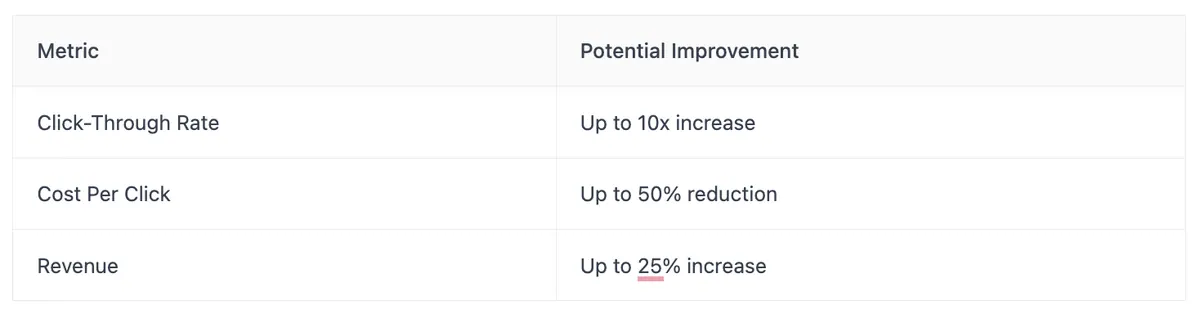
This shows that focusing on people who have already interacted with your brand can yield significant results.
Building Your Retargeting Foundation
Getting your retargeting strategy off the ground means setting some clear goals and knowing who you're trying to reach. It's not just about throwing ads out there; it's about being smart with your efforts. Think of it like planning a party, you need to know who you want to invite and what you want them to do when they get there.
Establishing Clear and Measurable Goals
When you're setting up retargeting for ticket sales, vague goals like "get more people to buy tickets" just won't cut it. You need to be specific. What exactly do you want to achieve? Are you trying to get people who looked at a specific event page to buy tickets? Or maybe you want to bring back people who added tickets to their cart but didn't finish the purchase? Setting clear, measurable goals helps you track what's working and what's not. For example, a goal could be: "Increase ticket sales for the 'Summer Music Fest' by 15% among users who visited the event page in the last 7 days."
Identifying Your Target Audience Segments
Who are you trying to reach with your ads? It's important to break down your potential audience into smaller groups. Think about:
- Website Visitors: People who just browsed your site.
- Cart Abandoners: Those who added tickets to their cart but left before buying.
- Past Purchasers: People who have bought tickets from you before (they might be interested in new events).
- Specific Event Viewers: Users who showed interest in a particular concert or show.
Understanding these different groups helps you tailor your message. What might convince someone who almost bought tickets to come back might be different from what brings a past attendee to a new event.
Choosing the Right Retargeting Platforms
There are several places you can run your retargeting ads. Each platform has its own strengths and the types of people who use it. Some popular options include:
- Google Ads: Great for reaching people across the web, including on YouTube and partner websites.
- Facebook & Instagram: Excellent for visual ads and reaching a broad audience based on interests and behaviors.
- LinkedIn: If you're selling tickets to professional events or conferences, this is a good choice.
Many services, like AdRoll or SharpSpring Ads, can help you manage campaigns across multiple platforms from one place. It's a good idea to pick platforms where your target audience spends their time.
Implementing Retargeting Pixels for Data Collection
How Tracking Pixels Work
Think of tracking pixels as tiny digital breadcrumbs. They're small snippets of code you place on your website. When someone visits your site, the pixel drops a cookie in their browser. This cookie is like a digital ID tag. As that person browses the internet later, the pixel communicates with ad platforms like Google or Facebook, letting them know this person showed interest in your event. This allows those platforms to show them ads related to your ticket sales. It’s a way to gently remind people about the event they looked at, without being overly pushy. The core idea is to re-engage visitors who didn't buy a ticket the first time.
Adding Pixels to Your Website
Getting these pixels onto your site is pretty straightforward, though it might sound a bit technical at first. You'll typically get a piece of code from the advertising platform you're using, whether it's Google Ads, Facebook Ads, or another service. This code needs to be added to the header section of your website. If you're using a website builder like WordPress, Shopify, or Squarespace, they often have specific areas in their settings where you can paste this code easily. For more complex sites, you might need to edit your website's HTML files directly, or get a web developer to help out. It’s important to place it correctly so it can start tracking visitors right away.
Here’s a quick rundown for common platforms:
- Google Ads: Go to 'Tools & Settings' > 'Conversions' > 'Create a new conversion action' to get your tag.
- Facebook Ads: Use the Facebook Pixel, which you can create in Ads Manager. Add the code to your website's header.
- Other Platforms (like CartStack): Check their setup guides; they usually have a dedicated section for finding your tracking code.
Utilizing Google Tag Manager for Multiple Campaigns
If you're running several retargeting campaigns, maybe for different events or different audience segments, managing all those individual pixels can get messy. That's where Google Tag Manager (GTM) comes in handy. Instead of adding multiple pieces of code directly to your website, you add just one GTM code. Then, through the GTM interface, you can manage all your other tracking tags, like Facebook pixels, Google Analytics tags, and more. It keeps everything organized in one place, making it much easier to add, remove, or update tracking without constantly editing your website's code. It’s a real time-saver and helps prevent errors when you’re juggling multiple marketing efforts.
Crafting High-Converting Retargeting Ads
So, you've got people interested in your event, maybe they even clicked through to buy tickets, but then... poof, they vanished. That's where crafting really good retargeting ads comes in. It's not just about showing them the same ad again; it's about showing them the right ad at the right time to nudge them back towards that purchase. Think of it as a friendly reminder, but with a bit more persuasive punch.
Designing Eye-Catching Visuals
Your ad's visual is the first thing people see, so it needs to grab their attention, fast. For ticket sales, this means using high-quality images or short videos of your event. Show the energy, the performers, the crowd having a good time, whatever makes your event unique. A blurry photo or a generic stock image just won't cut it. You want people to see the visual and immediately think, "Wow, I want to be there!"
Writing Compelling Ad Copy and CTAs
Once you've got their eyes, you need to keep their interest with your words. Your ad copy should speak directly to why someone was interested in the first place. Did they look at a specific performer? Mention them! Did they hesitate on price? Maybe offer a small discount or highlight the value they're getting. And the Call to Action (CTA)? It needs to be super clear. Instead of just "Learn More," try something like "Get Your Tickets Now" or "Don't Miss Out, Buy Today." Make it obvious what you want them to do next. You can check out some great examples of ad copy that works on Facebook's ad library.
Leveraging Urgency and Scarcity Tactics
People are often motivated by the fear of missing out. You can use this to your advantage in retargeting. Phrases like "Tickets are selling fast!" or "Limited seats remaining" can encourage immediate action. Another tactic is offering a special, time-sensitive discount just for those who are returning to your site. For example, "Complete your purchase in the next 24 hours and save 10%." This creates a reason for them to act now rather than later. Just be sure these offers are genuine; you don't want to lose trust.
Advanced Retargeting Strategies for Event Tickets