Things don't always go as planned, right? Especially with events. Sometimes, stuff happens: bad weather, unexpected problems, or changes in plans, and you have to cancel or reschedule. When that happens, dealing with ticket refunds can feel like a total mess. But it doesn't have to be! If you handle refunds well, it actually helps people trust you more and makes everything smoother for everyone. This article will show you some better ways to manage refunds and keep your event's good name. We'll talk about how to make event refund management easier and less stressful.
Key Takeaways
- Make sure your refund rules are super clear from the start.
- Use event software to handle refunds automatically.
- Think about offering other options instead of just money back.
- Always tell people what's happening right away and be open about it.
- Get your team ready to handle refund questions quickly and easily.
Establishing Clear Refund Policies
It's happened to everyone: you buy tickets to an event, and then life gets in the way. Maybe you can't go, or maybe the event gets canceled. That's where a solid refund policy comes in. Having a clear, well-defined refund policy is the first step in managing ticket refunds effectively. It sets expectations upfront and prevents a lot of headaches down the road. Think of it as a safety net for both you and your attendees.
Defining Eligibility Criteria
First, you need to spell out exactly when someone is eligible for a refund. Is it only for full cancellations? What about postponements? What if someone has a personal emergency? Be specific. For example:
- Event Cancellation: 100% refund.
- Event Postponement (more than 30 days): Option for a full refund.
- Personal Emergency (with proof): Case-by-case review.
Having clear eligibility criteria helps avoid disputes and makes the process fairer for everyone.
Setting Refund Request Deadlines
Don't leave the refund window open indefinitely. Set a clear deadline for refund requests. This helps you manage your finances and avoid last-minute chaos. A good rule of thumb is to allow a reasonable timeframe, like 14-30 days before the event, or within a week after an event cancellation announcement. Make sure this deadline is clearly communicated during the ticket purchase process.
Outlining the Refund Process
Make it easy for people to request a refund. Provide step-by-step instructions on how to submit a request, what information they need to provide, and how long it will take to process. A simple, straightforward process reduces frustration and improves customer satisfaction. Consider these steps:
- Submit a refund request form (online).
- Provide proof of purchase (ticket confirmation).
- Wait for confirmation (within 3-5 business days).
- Receive refund (within 7-10 business days).
A well-defined refund process not only protects your business but also builds trust with your audience. When people know what to expect, they're more likely to feel confident in purchasing tickets from you in the future.
Leveraging Event Ticketing Software for Automated Refunds
Manually dealing with refunds? It can get crazy, especially when you're running big events. That's where event ticketing software comes in handy. It can really change how you handle things.
Speeding Up Refund Processing
The right software can automate the whole refund process. No more doing everything by hand! This means people get their money back faster, and you don't have to spend hours on each refund. It's a win-win. Using a Sold Out Marketplace can help speed up the process.
Reducing Administrative Burden
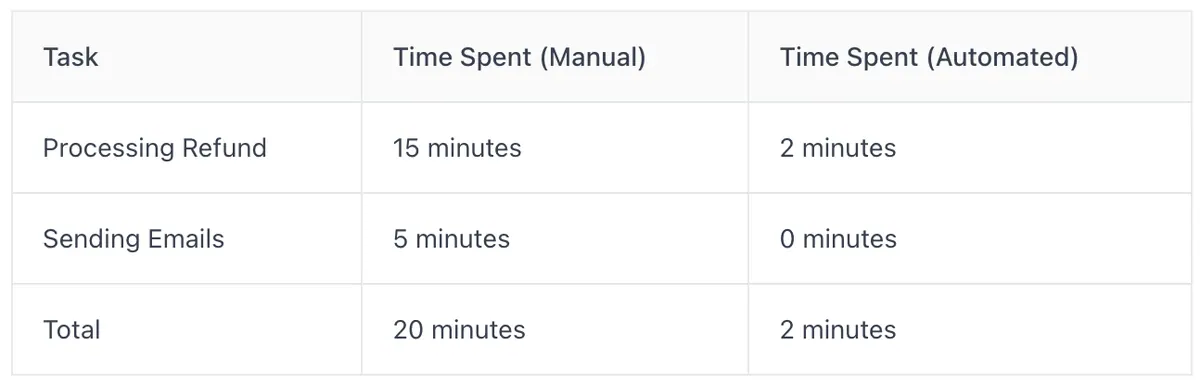
Think about all the time your team spends on refunds. It adds up! With automation, they can focus on other important stuff, like making sure the event itself is awesome. Less paperwork, fewer headaches. Here's a quick look at how much time can be saved:
Improving Transparency for Attendees
People want to know what's happening with their money. Good ticketing software lets them track their refund status. No more guessing games or endless emails asking for updates. They can see exactly where things stand. This builds trust and makes everyone happier.
Using event ticketing software for automated refunds is not just about making things easier for you; it's about providing a better experience for your attendees. When they know they can get a refund quickly and easily if something goes wrong, they're more likely to buy tickets in the first place.
Offering Flexible Alternatives to Refunds
Sometimes, giving a straight refund isn't the best move for anyone. It can hurt your bottom line, and the attendee might still be bummed about missing out. That's where flexible alternatives come in. Think of it as finding a win-win solution.
Providing Ticket Credits for Future Events
Instead of just handing back the money, why not offer a ticket credit? This encourages attendees to come back to future events, keeping them engaged with your organization. It's like saying, "Sorry this one didn't work out, but we'd love to see you at the next one!" Plus, it keeps the money within your ecosystem. It's a great way to build customer loyalty.
Issuing Discount Vouchers
Discount vouchers are another solid option. They don't cover the full cost like a refund, but they offer a nice incentive to attend another event or even purchase merchandise. You could tailor the discount to specific events or make it a general promotional offer. It's a good way to sweeten the deal and encourage future spending.
Offering Merchandise Incentives
This is a bit more creative, but it can work wonders. Offer attendees a piece of event merchandise (a t-shirt, a poster, etc.) as a substitute for a partial refund. This works especially well if the event had a strong theme or unique branding. It gives them something tangible to remember the event by, even if they couldn't attend. Plus, it can be cheaper than a full refund, depending on your event ticketing software costs.
Offering alternatives shows you care about the attendee experience beyond just the transaction. It's about building goodwill and fostering a long-term relationship, even when things don't go as planned.
Communicating Promptly and Transparently
When things go sideways and an event gets canceled, people get stressed. Clear communication is super important. It can make a bad situation a little better, or at least stop it from getting worse. Here's how to handle it:
Announcing Cancellations Immediately
Get the word out ASAP. Use every channel you've got. Don't wait for people to ask; tell them before they have to.
Emailing Attendees with Instructions
Email is still king for important stuff. Send a detailed email explaining why the event was canceled and what their options are. Include clear instructions on how to get a refund, if applicable. Make sure the email is easy to understand and answers common questions. You might want to look into online ticketing platforms to help with this.
Utilizing Social Media for Updates
Social media is great for quick updates and answering questions in real-time. Post regular updates about the cancellation and refund process. Respond to comments and messages promptly. Don't ignore complaints; address them directly and professionally.
Think of it this way: people are already bummed about the cancellation. Don't make it worse by leaving them in the dark. Be upfront, be honest, and be responsive. It'll go a long way toward preserving goodwill.
Training Your Support Team for Efficient Refund Handling

Having a support team that knows its stuff is super important when it comes to dealing with refunds. You don't want confused staff giving out wrong info or taking forever to process requests. That just makes everyone mad. Here's how to get your team up to speed.
Equipping Staff with Clear Policies
Make sure everyone on your team knows the refund policy inside and out. It sounds obvious, but you'd be surprised. Go over the details regularly, and answer any questions they have. If the policy changes, tell them right away. It's also a good idea to give them a written copy they can refer to. This way, they can handle inquiries confidently and consistently. Consistency is key here.
Providing Pre-Written Response Templates
Time is money, and nobody wants to wait forever to hear back about a refund. Create some pre-written email templates for common refund scenarios. This saves your team time and makes sure everyone gets the same, accurate information. Here are a few examples:
- Refund request received
- Refund approved
- Refund denied (with explanation)
- Request for more information
Having these templates ready to go can seriously cut down on response times and free up your team to handle more complex issues.
Empowering Swift Refund Processing
Give your support team the power to actually do something. If they have to ask a manager for approval every single time, it slows everything down. Set a limit for the refund amount they can approve on their own. This lets them handle most requests quickly and only escalate the really big or unusual ones. It makes the whole process smoother for everyone involved.
Utilizing Technology to Simplify Refund Processes